一、ROS是什么? ROS本质上是用于快速搭建机器人的软件库(核心是通信)和工具集
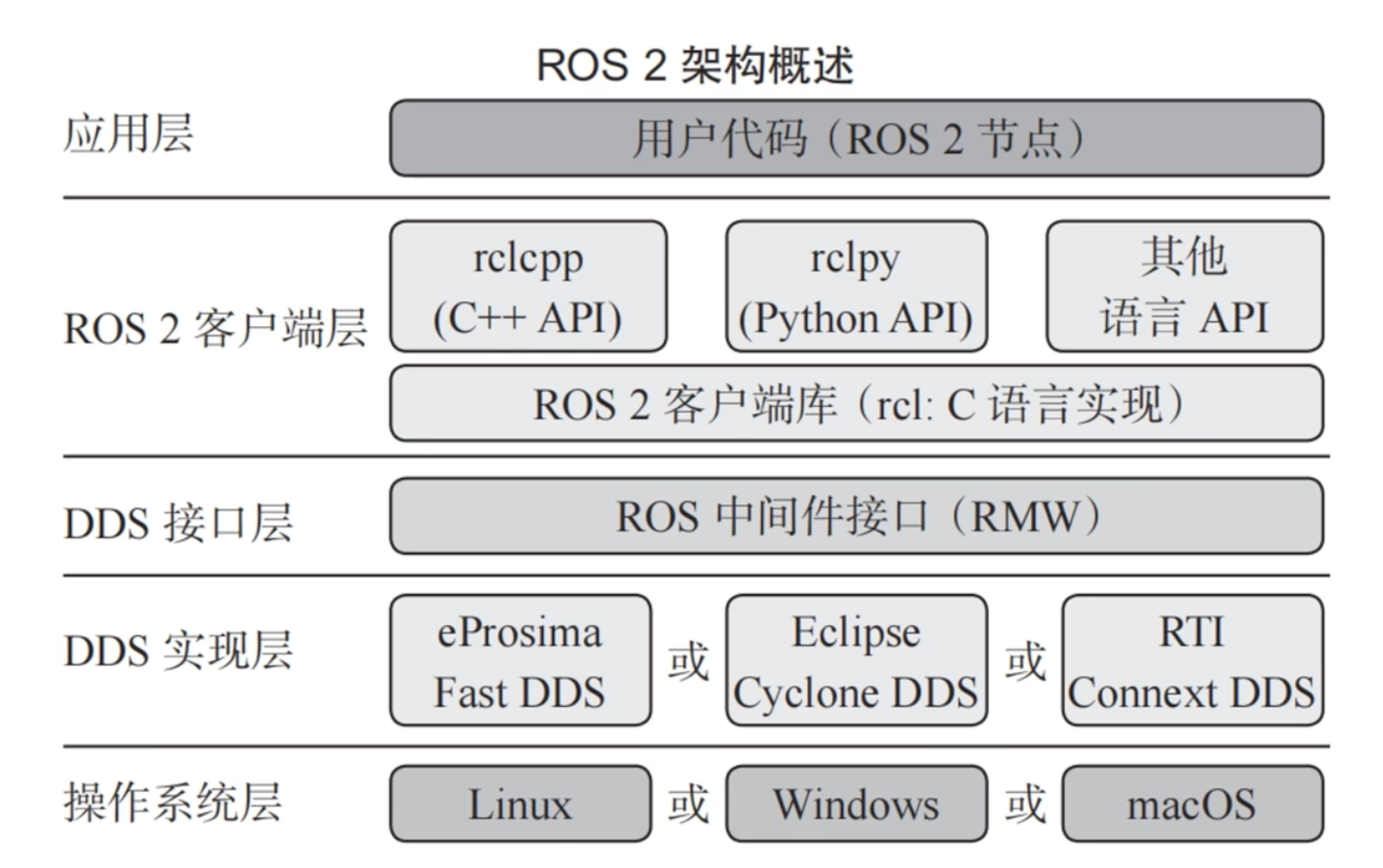
ROS2的系统架构:
在日常开发中,主要关注应用层和客户端层
ROS2 开发特色 四大通信机制:
通信(Topic):基于发布-订阅模式通信,允许节点异步交换数据
服务(Service):同步通信,客户端发送请求,服务端处理并返回结果
参数(Parameter):用于机器人参数的设置和读取
动作(Action):支持复杂行为的通信模式,服务端可以反馈处理进度,客户端可以取消请求
缺陷:
ROS并非真正的操作系统,而是一个软件,受操作系统限制
本身做不到实时性,硬实时还得依赖操作系统
通信速度受内存/网速等物理层限制
大而全
二、ROS2 节点 利用功能包组织节点 // 暂时忽略
WorkSpace 工作空间下构建所有功能包:
1 2 3 4 5 6 7 8 9 vstral@ubuntuROS2:~/ROS2Code $ tree . -L 3 . ├── chapt2_ws │ └── src │ └── demo_cpp_pkg ├── CMakeLists.txt.bak └── ros2_cpp_node.cpp 4 directories , 2 files
执行:
1
2
3
4
5
6
7
8
9
10
11
12
13
14
15
16
17
18
19
20
21
22
23
24
25
26
27
28
29
30
31
colcon build vstral@ubuntuROS2:~/ROS2Code $ tree . -L 2 . ├── build │ ├── COLCON_IGNORE │ └── demo_cpp_pkg ├── chapt2_ws │ └── src ├── CMakeLists.txt.bak ├── install │ ├── COLCON_IGNORE │ ├── demo_cpp_pkg │ ├── local_setup.bash │ ├── local_setup.ps1 │ ├── local_setup.sh │ ├── _local_setup_util_ps1.py │ ├── _local_setup_util_sh.py │ ├── local_setup.zsh │ ├── setup.bash │ ├── setup.ps1 │ ├── setup.sh │ └── setup.zsh ├── log │ ├── build_2026 -09-10_20 -58-02 │ ├── COLCON_IGNORE │ ├── latest -> latest_build │ └── latest_build -> build_2026 -09-10_20 -58-02 └── ros2_cpp_node.cpp 11 directories , 15 files
单独构建功能包:
1 2 3 4 5 vstral@ubuntuROS2:~/ROS2Code $ colcon build --packages -select demo_cpp_pkg Starting >>> demo_cpp_pkg Finished <<< demo_cpp_pkg [0.04s ]Summary : 1 package finished [0.11s ]
正确的项目结构为:
1
2
3
4
5
6
7
8
9
10
11
12
13
14
15
16
17
18
19
20
21
22
23
24
25
26
27
28
29
30
31
32
$ tree . -L 2 . ├── build │ ├── COLCON_IGNORE │ ├── compile_commands.json │ └── demo_cpp_topic ├── install │ ├── COLCON_IGNORE │ ├── demo_cpp_topic │ ├── local_setup.bash │ ├── local_setup.ps1 │ ├── local_setup.sh │ ├── _local_setup_util_ps1.py │ ├── _local_setup_util_sh.py │ ├── local_setup.zsh │ ├── setup.bash │ ├── setup.ps1 │ ├── setup.sh │ └── setup.zsh ├── log │ ├── build_2026-09-12_14-28-16 │ ├── build_2026-09-12_14-33-59 │ ├── build_2026-09-12_14-34-34 │ ├── build_2026-09-12_14-35-01 │ ├── build_2026-09-12_14-36-51 │ ├── COLCON_IGNORE │ ├── latest -> latest_build │ └── latest_build -> build_2026-09-12_14-36-51 └── src └── demo_cpp_topic 15 directories, 14 files
运行colcon应在项目根目录,为了vscode内clangd能够解析
可以在工作去根目录配置 .clangd
1
2
3
CompileFlags: CompilationDatabase: build
CMakeLists.txt中常用的添加配置:
1 2 3 4 5 6 7 8 9 10 11 12 13 14 15 16 17 18 19 20 21 include_directories (include ) add_executable (novel_pub_node src/novel_pub_node.cpp) ament_target_dependencies(novel_pub_node rclcpp example_interfaces) install (TARGETS novel_pub_node DESTINATION lib/${PROJECT_NAME} )
三、ROS2 中的c++基础 利用C++面向对象创建节点 demo_cpp_pkg/src/person_node.cpp:
1 2 3 4 5 6 7 8 9 10 11 12 13 14 15 16 17 18 19 20 21 22 23 24 25 26 27 28 29 30 31 32 33 #include "rclcpp/logging.hpp" #include "rclcpp/node.hpp" #include "rclcpp/rclcpp.hpp" class PersonNode : public rclcpp::Node {private : std::string name_; int age_; public : PersonNode (const std::string &node_name, const std::string &name, const int &age) : Node (node_name) { this ->name_ = name; this ->age_ = age; }; void eat (const std::string &food_name) RCLCPP_INFO (this ->get_logger (), "我是%s, %d岁, 爱吃%s" , this ->name_.c_str (), this ->age_, food_name.c_str ()); }; }; int main (int argc, char **argv) rclcpp::init (argc, argv); auto node = std::make_shared <PersonNode>("person_node" , "vstral" , 20 ); RCLCPP_INFO (node->get_logger (), "你好, C++节点!" ); node->eat ("白菜" ); rclcpp::spin (node); rclcpp::shutdown (); return 0 ; }
CMakeLists.txt:
1
2
3
4
5
6
7
8
9
10
11
12
13
14
15
16
17
18
19
20
21
22
23
24
25
26
27
28
29
30
31
32
33
34
35
36
37
38
39
40
41
cmake_minimum_required (VERSION 3.8 )project (demo_cpp_pkg)if (CMAKE_COMPILER_IS_GNUCXX OR CMAKE_CXX_COMPILER_ID MATCHES "Clang" ) add_compile_options (-Wall -Wextra -Wpedantic) endif ()find_package (ament_cmake REQUIRED)find_package (rclcpp REQUIRED)add_executable (cpp_node src/cpp_node.cpp)add_executable (person_node src/person_node.cpp)ament_target_dependencies(cpp_node rclcpp) ament_target_dependencies(person_node rclcpp) install ( TARGETS cpp_node person_node DESTINATION lib/${PROJECT_NAME} ) if (BUILD_TESTING) find_package (ament_lint_auto REQUIRED) set (ament_cmake_copyright_FOUND TRUE ) set (ament_cmake_cpplint_FOUND TRUE ) ament_lint_auto_find_test_dependencies() endif ()ament_package()
ROS2 中有用的C++新特性 自动类型推导 1 auto node = std::make_shared <PersonNode>("person_node" , "vstral" , 20 );
利用等号右边的内容自动推到左侧变量的类型,auto代表自动类型推导
共享指针 1 2 3 4 5 6 7 8 #include <iostream> #include <memory> int main () auto p1 = std::make_shared <std::string>("Hello" ); return 0 ; }
Lambda lambda是一种匿名函数
1 [capture list](parameters) -> return_type {function body}
capture list是捕获列表,可以直接把捕获列表里面的变量直接加入到作用域中
1 2 3 4 5 6 7 8 9 10 11 12 13 #include <iostream> #include <algorithm> int main () auto add = [](int a, int b) -> int {return a+b;}; int sum = add (50 , 200 ); auto printsum = [sum]() -> void { std::cout << sum << std::endl; }; printsum (); return 0 ; }
函数包装器 C++中的三类函数:
自由函数:不在任何类的内部,只需要函数名就可以调用函数
成员函数:也叫方法,在类的内部进行定义,通过对象.方法名进行调用
Lambda函数:匿名函数
在调用函数的时候需要区分很麻烦,使用函数包装器可以统一格式
1 2 3 4 5 6 7 8 9 10 11 12 13 14 15 16 17 18 19 20 21 22 23 24 25 26 27 28 29 30 31 32 33 34 35 36 37 38 39 40 41 42 43 44 45 #include <iostream> #include <functional> void save_with_free_fun (const std::string& file_name) std::cout << "自由函数:" << file_name <<std::endl; } class FileSave { private : public : FileSave () = default ; ~FileSave () = default ; void save_with_member_fun (const std::string& file_name) std::cout << "成员方法" << file_name <<std::endl; } }; int main () FileSave file_save; auto save_with_lambda_function = [](const std::string &file_name) -> void { std::cout << "lambda函数: " << file_name << std::endl; }; std::function<void (const std::string&)> save1 = save_with_free_fun; std::function<void (const std::string&)> save2 = save_with_lambda_function; std::function<void (const std::string&)> save3 = std::bind (&FileSave::save_with_member_fun, &file_save, std::placeholders::_1); save1 ("file.txt" ); save2 ("file.txt" ); save3 ("file.txt" ); return 0 ; }
作用:在后续使用回调函数的时候会用到,可以防止访问整个对象的不必要方法
多线程与回调函数 1 2 3 4 5 6 7 8 9 10 11 12 13 14 15 16 17 18 19 20 21 22 23 24 25 26 27 28 29 30 31 32 33 34 35 36 37 38 39 40 41 42 43 44 45 46 47 48 49 50 51 52 53 54 55 56 57 58 59 60 61 62 63 64 65 66 67 68 69 70 71 72 73 74 75 76 77 78 79 80 81 82 83 84 85 86 87 88 89 90 91 92 93 94 95 96 97 98 99 100 101 102 103 104 105 106 107 108 109 110 111 112 113 114 115 #include "cpp-httplib/httplib.h" #include <chrono> #include <functional> #include <iostream> #include <thread> class Download {private :public :void download (const std::string &host, const std::string &path, const std::function<void (const std::string &, const std::string &)>&callback_word_count) std::cout << "线程" << std::this_thread::get_id () << std::endl; httplib::Client client (host) ;auto response = client.Get (path);if (response && response->status == 200 ) {callback_word_count (path, response->body);} else { std::cout << "error: " << response.error () << std::endl; std::cout << "error code: " << response->status << std::endl; } }; void start_download ( const std::string &host, const std::string &path,const std::function<void (const std::string &, const std::string &)>&callback_word_count) auto download_dunction =std::bind (&Download::download, this , std::placeholders::_1, std::placeholders::_2, std::placeholders::_3); std::thread thread (download_dunction, host, path, callback_word_count) ;thread.detach (); }; }; int main () std::cout << "程序启动..." << std::endl; auto d = Download ();auto word_count = [](const std::string &path,const std::string &result) -> void {std::cout << "下载完成:" << path << result.length () << result.substr (0 , 5 ) << std::endl; }; d.start_download ("api.vstral.top" , "/robots.txt" ,word_count); d.start_download ("api.vstral.top" , "/robots.txt" ,word_count); d.start_download ("api.vstral.top" , "/robots.txt" ,word_count); std::this_thread::sleep_for (std::chrono::milliseconds (1000 * 10 )); return 0 ;}
四、话题通信 在IOT中,常用MQTT协议来作为订阅发布机制,在机器人中有很多的传感器、执行器等,为了让机器人整体保持通信信息传递。在ROS2中也有这种订阅发布机制
ROS2中话题通信有四个重点:发布者、订阅者、话题名称、话题类型
启动海龟模拟器:
1 ros2 run turtlesim turtlesim_node
查看节点信息:
1 2 ros2 node list ros2 node info /turtlesim
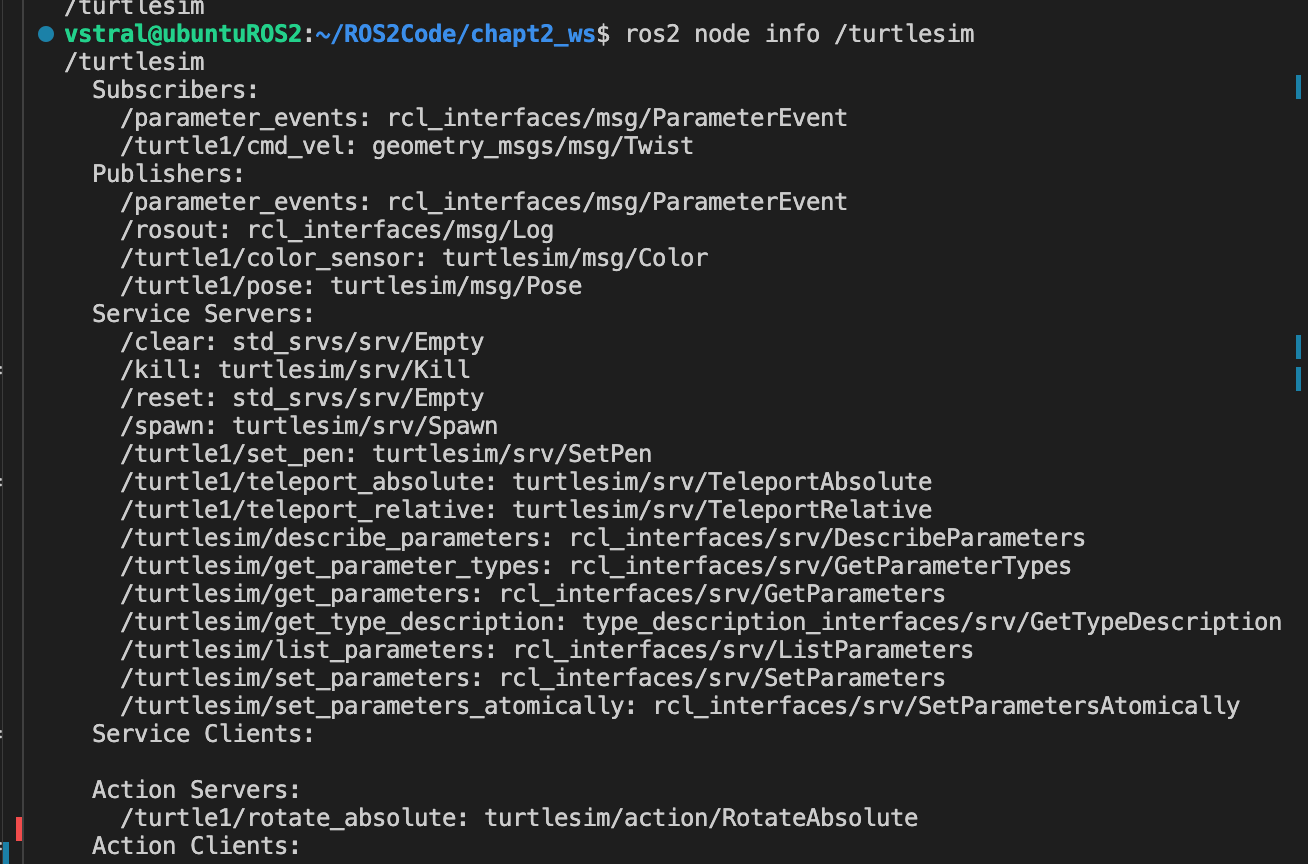
可以从中看到节点的信息
subscribers就是订阅的话题,publishers就是发布的话题
turtle1/cmd_vel 是控制小海龟的话题
turtle1/pose 就是小海龟的位置信息
使用命令行获取话题信息:
1 2 3 ros2 topic echo [话题名] // 输出话题消息内容 ros2 topic info [话题名] // 可以查看接口类型,发布者和订阅者数量 ros2 interface show [类型名] // 查看接口定义
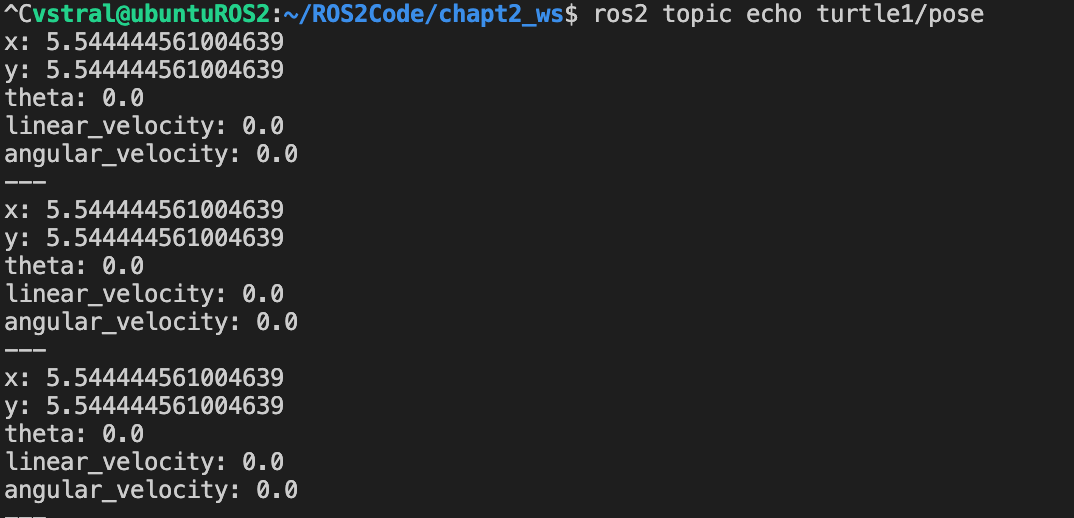
x/y代表坐标点
theta代表弧度(不是角度)
linear_velocity:线速度
angular_velocity:角速度(逆时针为正)
使用命令行操作话题(注意空格)
1 2 3 4 5 6 7 8 9 10 11 12 13 14 15 16 //interface:ros2 interface show geometry_msgs/msg/Twist // # This expresses velocity in free space broken into its linear and angular parts. // // Vector3 linear // float64 x // float64 y // float64 z // Vector3 angular // float64 x // float64 y // float64 z ros2 topic pub /turtle1/cmd_vel geometry_msgs/msg/Twist "{linear: {x: 0.5, y: 0.0} , angular: {z : 0.0}}" // 可用 -r 改变话题消息发送频率
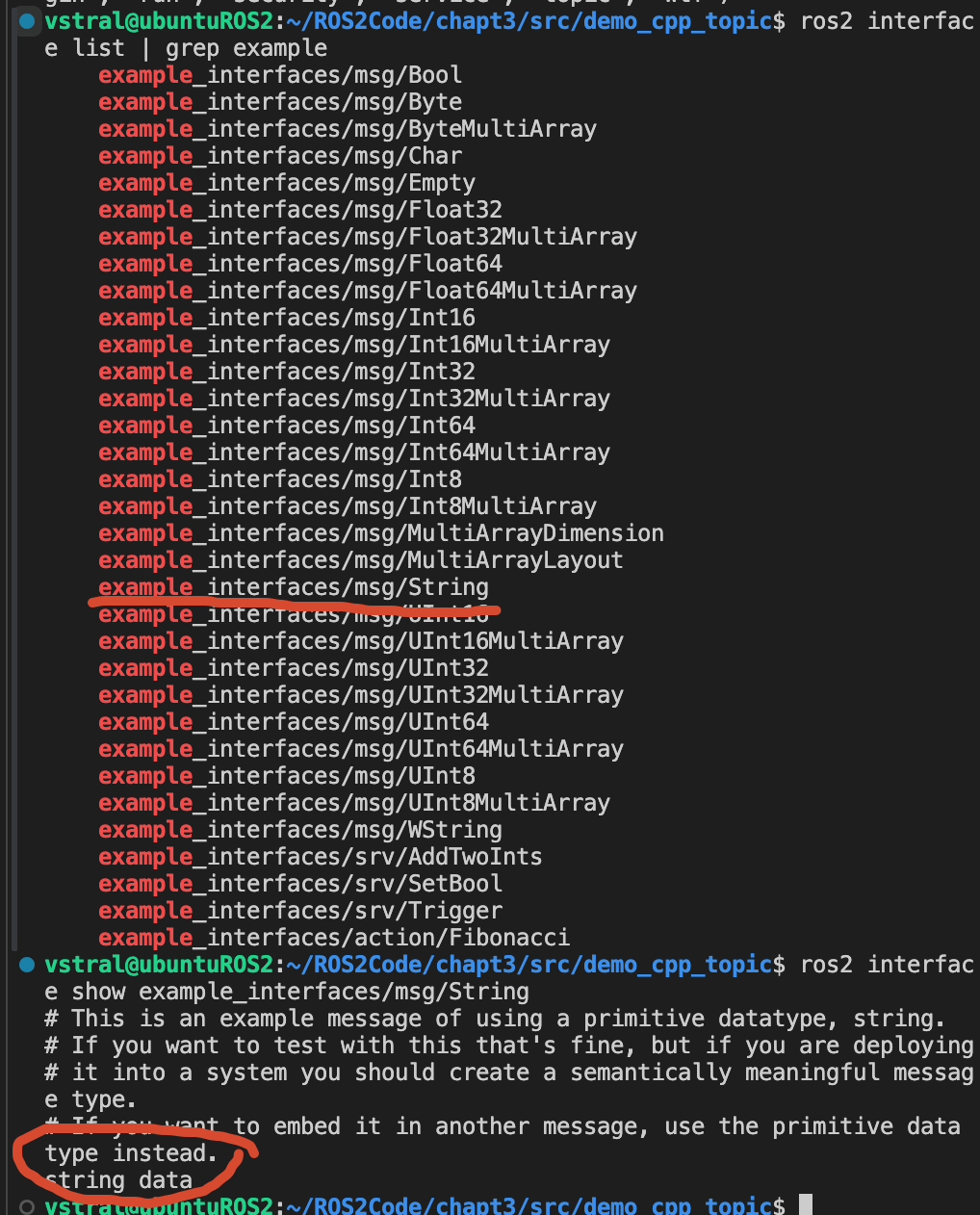
通过话题发布小说 使用依赖example_interfaces,方便使用到字符串类型接口
ros2中打印日志使用宏RCLCPP_INFO
1 2 3 4 5 6 7 8 9 10 11 12 13 14 15 16 17 18 19 20 21 22 23 24 25 26 27 28 29 30 31 32 33 34 35 36 37 38 39 40 41 42 43 44 45 46 47 48 49 50 51 52 53 54 55 56 57 58 59 60 61 62 63 64 65 66 67 68 69 70 71 72 73 74 75 76 77 78 79 80 81 82 83 84 85 86 87 88 89 90 91 92 93 94 95 96 97 98 99 100 101 102 103 104 105 106 107 108 109 110 111 112 113 114 115 116 117 118 119 120 121 122 123 124 125 126 127 128 129 130 131 132 133 134 135 136 137 138 139 140 141 142 143 144 145 146 147 148 149 150 151 152 153 #include "rclcpp/rclcpp.hpp" #include "cpp-httplib/httplib.h" #include "std_msgs/msg/string.hpp" #include <chrono> #include <queue> #include <sstream> #include <string> #include <vector> class NovelPubNode : public rclcpp::Node {public : rclcpp::Publisher<std_msgs::msg::String>::SharedPtr novel_publisher_; rclcpp::TimerBase::SharedPtr time_; std_msgs::msg::String novel_text; std::queue<std::string> novel_queue_; NovelPubNode (const std::string &node_name) : Node (node_name) {RCLCPP_INFO (this ->get_logger (), "%s, start successfully!" , node_name.c_str ()); novel_publisher_ = this ->create_publisher <std_msgs::msg::String>("novel_topic" , 10 ); novel_text.data = download ("localhost" , "/novel1.txt" ); auto novel_lines = split_text (novel_text.data);time_ = this ->create_wall_timer ( std::chrono::seconds (1 ), [this , novel_lines]() { publish_novel (novel_lines); }); } void publish_novel (const std::vector<std::string> &novel_lines) if (!novel_lines.empty ()) {for (const auto &line : novel_lines) {novel_text.data = line; novel_publisher_->publish (novel_text); RCLCPP_INFO (this ->get_logger (), "Published: %s" , line.substr (0 , 10 ).c_str ());} } } std::string download (const std::string &url, const std::string &path) {httplib::Client client (url, 8000 ) ;client.set_connection_timeout (5 , 0 ); auto response = client.Get (path);if (response && response->status == 200 ) {auto text = response->body;RCLCPP_INFO (this ->get_logger (), "start downloading. length: %s" , std::to_string (text.length ()).c_str ());return text;} else { const auto status = response ? std::to_string (response->status) : "connection failed" ;RCLCPP_ERROR (this ->get_logger (), "download failed, status: %s" , status.c_str ());return "" ;} } private :std::vector<std::string> split_text (const std::string &text) {std::vector<std::string> lines; std::istringstream iss (text) ;std::string line; while (std::getline (iss, line)) {lines.push_back (line); } return lines;} }; int main (int argc, char **argv) rclcpp::init (argc, argv); auto node = std::make_shared <NovelPubNode>("novel_pub_node" );rclcpp::spin (node); rclcpp::shutdown (); return 0 ;}
由于我的C嘎嘎能力太菜了,实现很多地方不符合开发规范,后续还得学学